Connected Plan
$9.99 /mo
Best for testing the workflow or shipping seasonally.
- Single and batch label workflows
- TCGplayer order address extraction
- Shipment history dashboard
- Use your own EasyPost account
- Stripe billing portal access
CardShipper turns TCGplayer orders into ready-to-print labels with address extraction, USPS rate preview, batch processing, and shipment history in one Chrome extension.
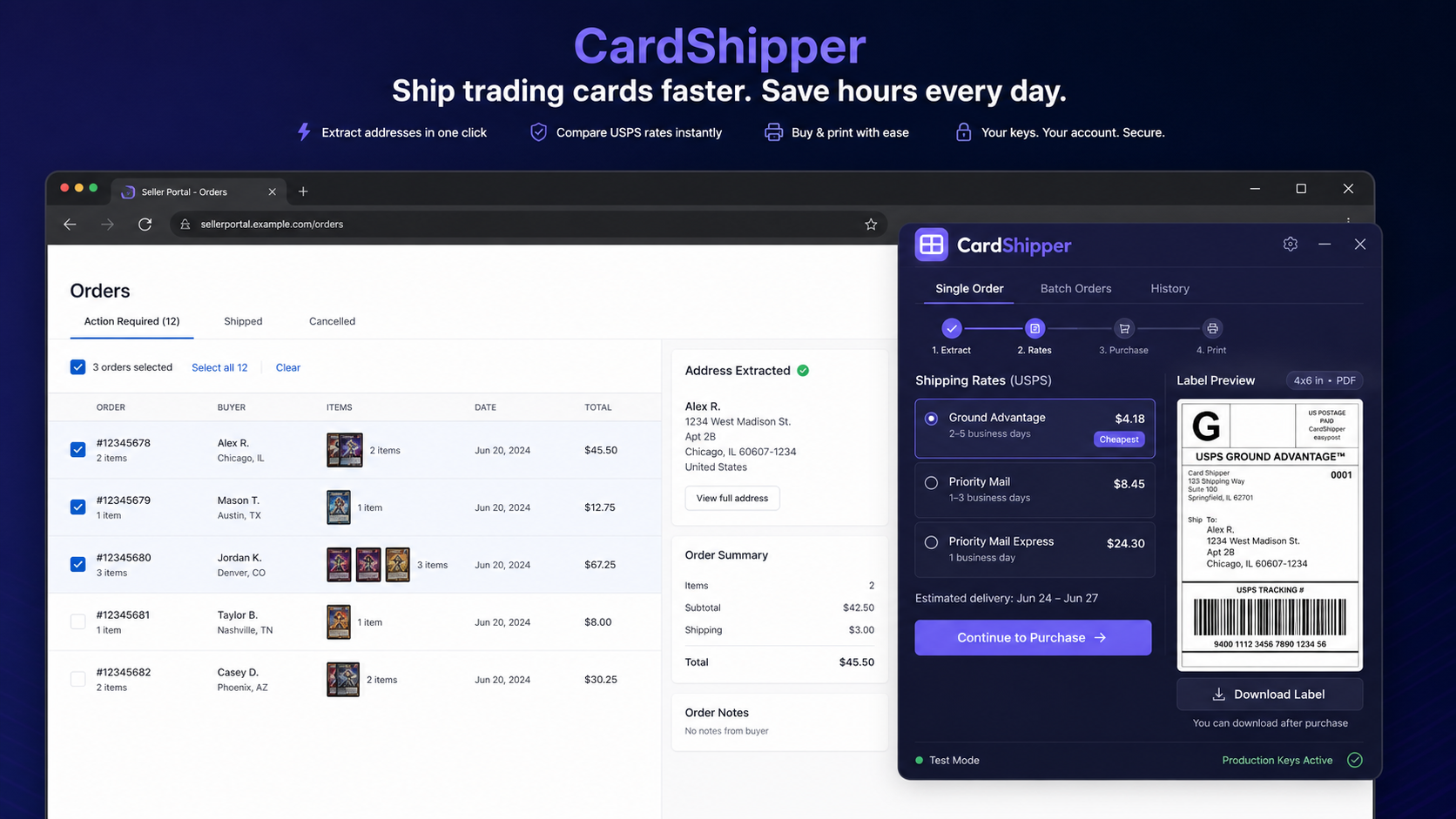
CardShipper is built around the real seller flow: select orders, pull addresses, preview rates, buy labels, and keep the tracking record.
Use CardShipper on the TCGplayer seller portal while your orders are already in front of you.
Pull recipient details into the label flow without manually retyping shipping blocks.
Use your EasyPost account to compare USPS rates before you commit to a label.
Open labels for printing and keep shipment history with customer, tracking, and cost details.
No heavy shipping platform migration. No postage wallet locked inside another app. CardShipper connects your seller workflow to your own EasyPost account.
Reduce typo risk by pulling order address data into the shipping workflow instead of re-keying it.
Load selected TCGplayer orders, preview rates, and buy labels across the batch.
Manage your subscription through Stripe, including card updates and cancellation.
Your EasyPost keys are stored through the backend, not exposed as plain text in the extension.
Search purchased labels by customer, order, tracking number, carrier, and date.
Move quickly on one urgent order or work through a group of selected orders.
Start monthly or save with annual billing. You can manage billing through Stripe after subscribing.
Best for testing the workflow or shipping seasonally.
For sellers who ship consistently and want the lowest yearly cost.
Create your CardShipper account on the website, subscribe through Stripe, then sign into the extension with the same email. You bring your own EasyPost account and postage funds.
Create your website account, choose monthly or yearly billing, install the extension, add your EasyPost key, then run one test shipment before switching to production mode.
Yes. CardShipper uses your EasyPost account to create rates and labels. Your postage funds stay in your EasyPost account.
Yes. Use the Billing button in the extension to open Stripe's customer portal and manage your subscription.
Yes. You can save both EasyPost test and production keys, then switch modes from the extension settings.
The current workflow is built around TCGplayer. Other marketplaces can be added later without changing the billing model.
Start with the extension, subscribe when prompted, and keep your EasyPost account in control of postage.
Create account